最近收到一封咨询邮件,根据他的需求,当一台RouterOS有两个或以上的公网IP地址,然后要求使用PPTP,L2TP,SSTP或OVPN等隧道协议连接到RouterOS,并根据连接指定的公网IP走改公网IP的出口转发出去,如下图:
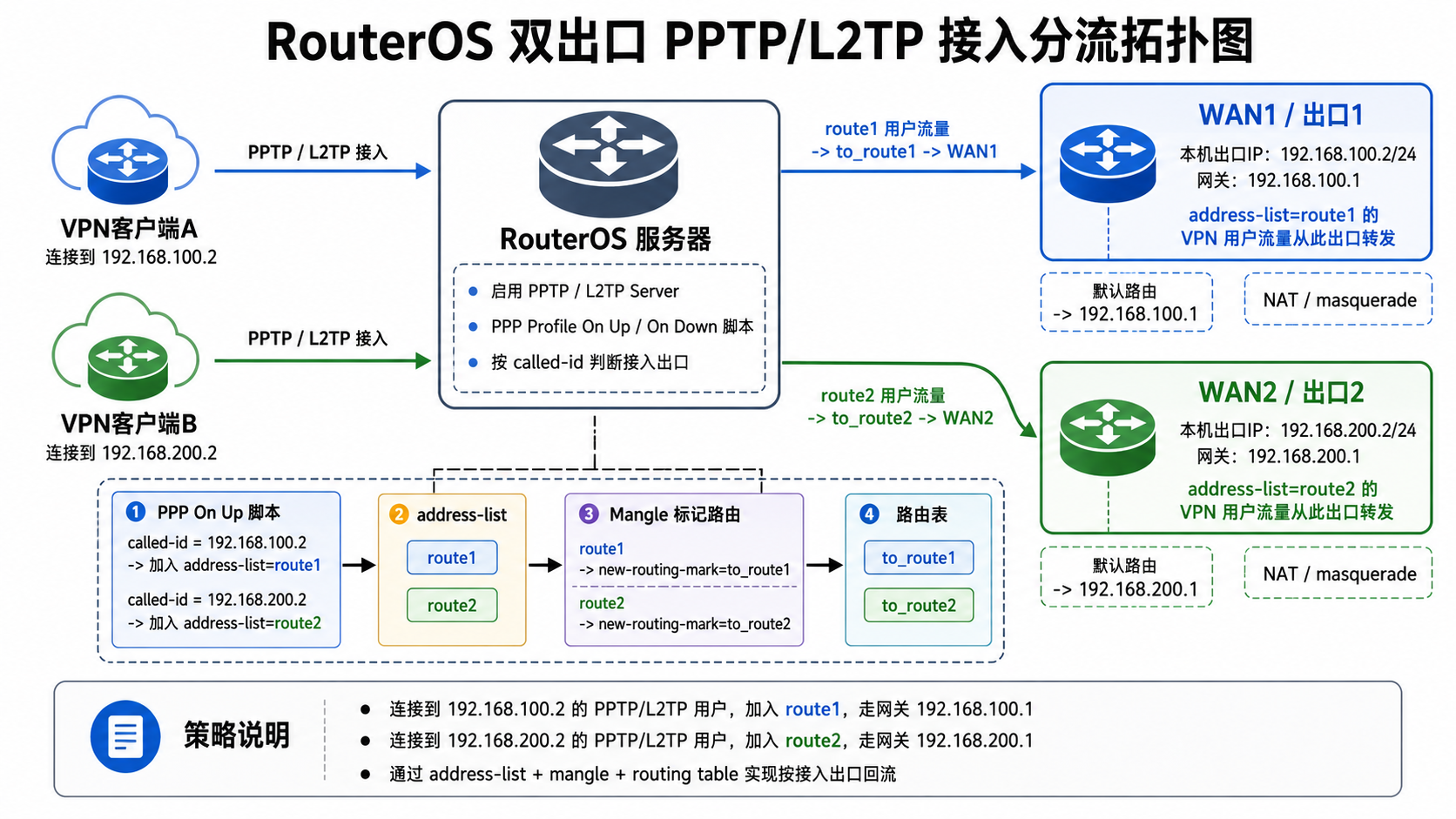
上面的拓扑图有2个公网出口WAN1:192.168.100.2和WAN2:192.168.200.2,当客户端B连接WAN2,默认的转发出口还是WAN2,反之是WAN1。目前的的思路是利用/ppp/profile创建规则,隧道连接成功会触发On-Up脚本触发器,执行让客户端B账号获取的隧道IP加入到一个address-list,然后在做策略路由指定到WAN2出口。
注意:该方案只适用于PPP协议的隧道,其他隧道不适用。
路由配置
路由配置需要特别说明下,因为有两条出口,对于路由器来说通常默认只有一条默认路由(除非配置ECMP),当只配置默认路由时只能访问到一条出口,另外一条能被访问,但回复会走默认出去导致回复失败。因此我们需要创建另个一条出口的源进源出的策略路由,多条出口也是同理配置
WAN1 作为主默认路由
/ip route
add dst-address=0.0.0.0/0 gateway=192.168.100.1 distance=1 comment="默认路由走WAN1"
这条是路由器的全局默认路由。
创建 WAN2 策略路由表
/routing table
add name=to_wan2 fib
然后给 WAN2 路由表添加默认路由:
/ip route
add dst-address=0.0.0.0/0 gateway=192.168.200.1 routing-table=to_wan2 distance=1 comment="创建WAN2的策略路由表"
这样 to_wan2 路由表里的默认出口就是:
192.168.200.1让“从 WAN2 进来的连接”回包也走 WAN2
这是最关键的部分。外部用户连接 192.168.200.2 的 PPTP/L2TP 时,请求包从 WAN2 进来。由于 RouterOS 主默认路由是 WAN1,如果不处理,RouterOS 的回包可能会从 WAN1 出去,导致连接失败。
添加 mangle:
/ip firewall mangle
add chain=input in-interface=ether-wan2 connection-state=new action=mark-connection new-connection-mark=wan2_in_conn passthrough=yes comment="标记来至WAN2的连接"
add chain=output connection-mark=wan2_in_conn action=mark-routing new-routing-mark=to_wan2 passthrough=no comment="从WAN2进入的走“to_wan2”路由表查询"
这两条的作用:
从 WAN2 进来的访问 RouterOS 本机的连接打上 connection-mark=wan2_in_conn 标记。RouterOS 本机回复这些连接时,将wan2_in_conn 标记走 routing-mark=to_wan2路由标记从 192.168.200.1 网关出去
Profile变量
在ppp proflie的规则中,有On-Up和On-Down两个脚本触发法器,在这个脚本触发器提供了可以直接获取的本地变量
$"user" - PPP 用户名
$"local-address" - 服务端分配给自己这一端的隧道内地址
$"remote-address" - 分配给客户端的隧道内地址
$"caller-id" - 客户端来源地址/Caller ID,PPTP/L2TP 常见就是对端公网 IP
$"called-id" - 被呼叫地址/服务端地址
$"interface" - 动态 PPP 接口 ID,不一定直接是接口名字
部署
1、创建Up和Down触发脚本
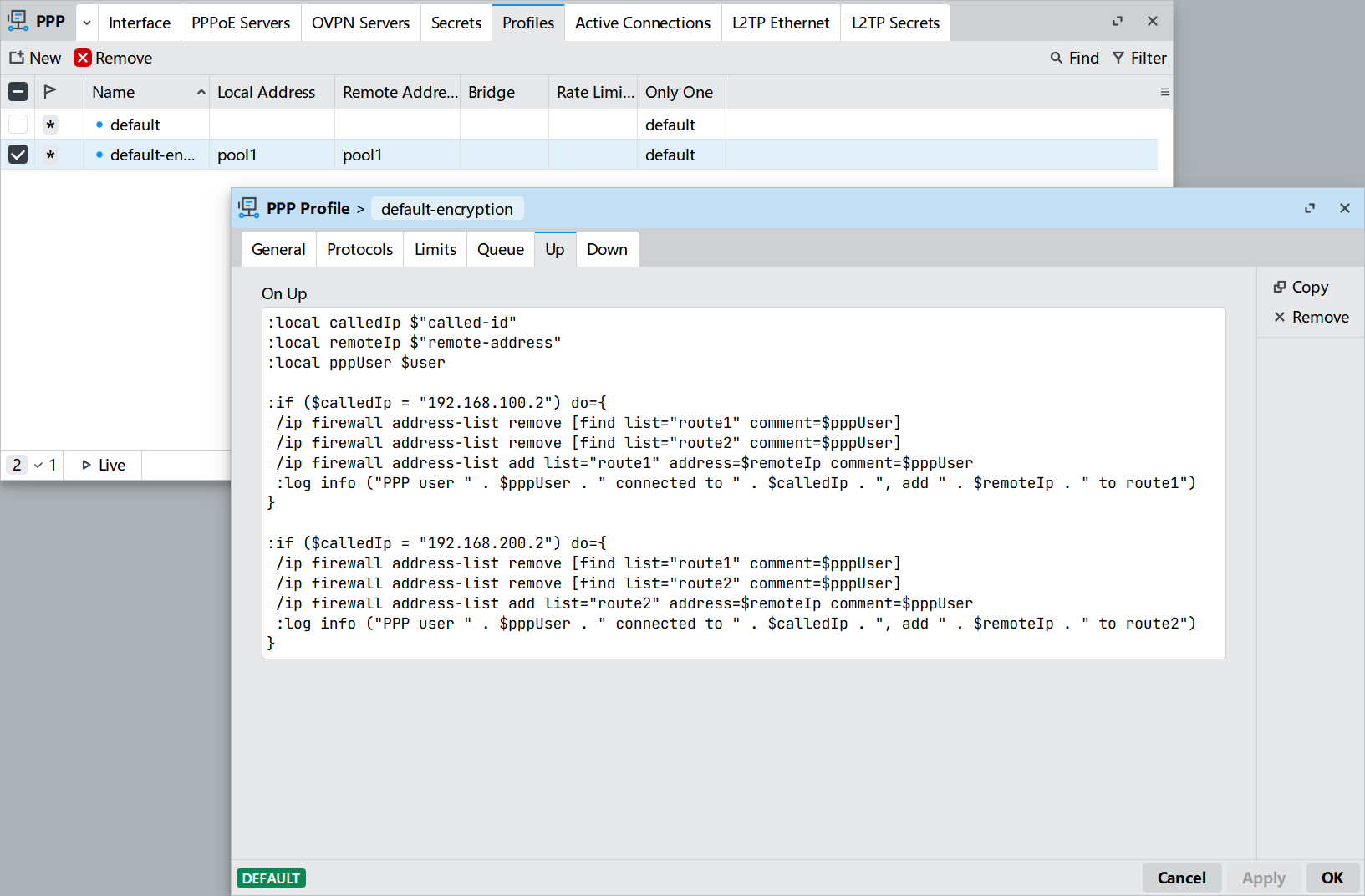
Winbox进入Profile创建On-Up触发脚本
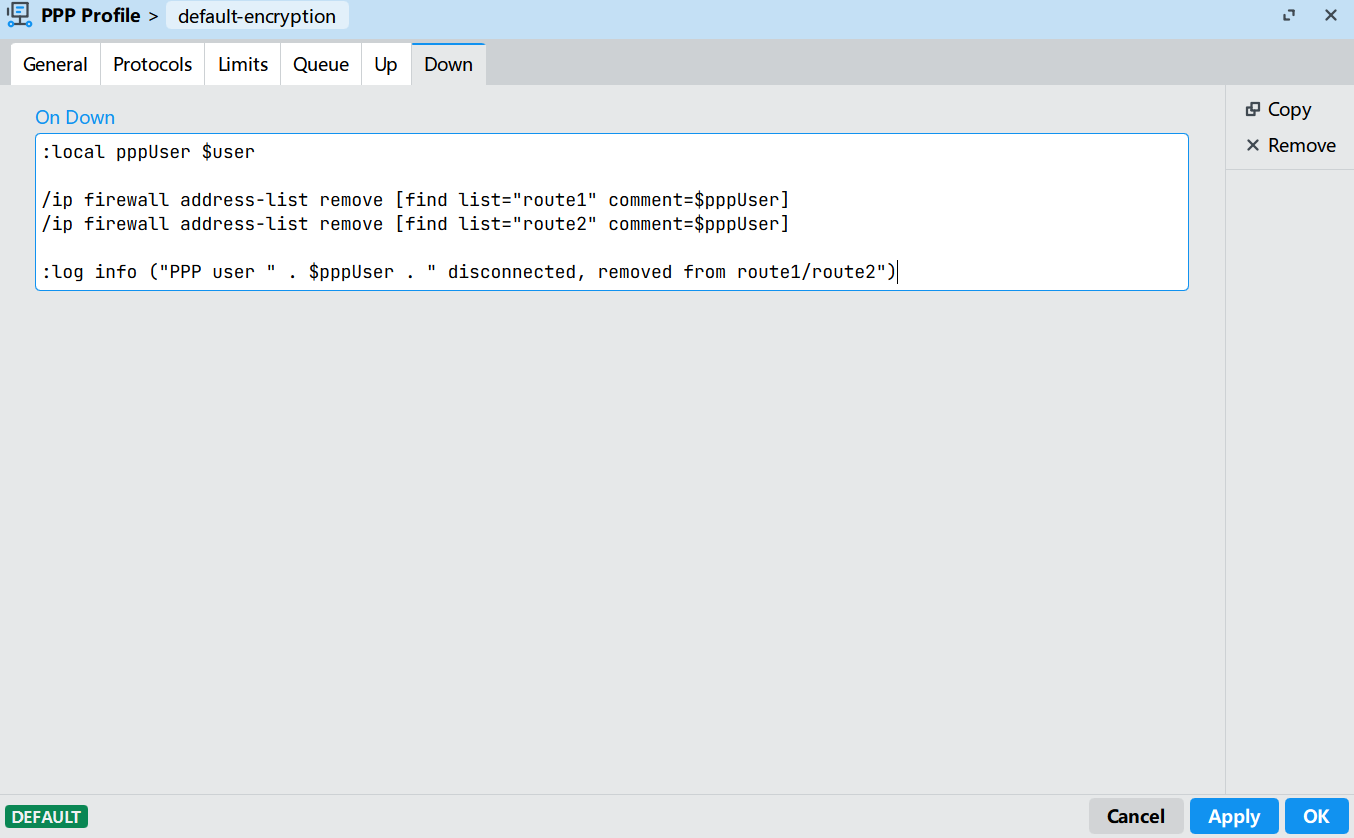
创建On-Down脚本
当ppp拨号成功,执行On-Up脚本
:local calledIp $"called-id"
:local remoteIp $"remote-address"
:local pppUser $user

:if ($calledIp = "192.168.100.2") do={
 /ip firewall address-list remove [find list="route1" comment=$pppUser]
 /ip firewall address-list remove [find list="route2" comment=$pppUser]
 /ip firewall address-list add list="route1" address=$remoteIp comment=$pppUser
 :log info ("PPP user " . $pppUser . " connected to " . $calledIp . ", add " . $remoteIp . " to route1")
}

:if ($calledIp = "192.168.200.2") do={
 /ip firewall address-list remove [find list="route1" comment=$pppUser]
 /ip firewall address-list remove [find list="route2" comment=$pppUser]
 /ip firewall address-list add list="route2" address=$remoteIp comment=$pppUser
 :log info ("PPP user " . $pppUser . " connected to " . $calledIp . ", add " . $remoteIp . " to route2")
}
当ppp拨号断开,执行On-Down脚本
:local pppUser $user

/ip firewall address-list remove [find list="route1" comment=$pppUser]
/ip firewall address-list remove [find list="route2" comment=$pppUser]

:log info ("PPP user " . $pppUser . " disconnected, removed from route1/route2")
注意:拨号断开要求是正常的断开流程,如果异常中断连接,可能无法正常删除地址列表的IP。在On-Up脚本有一个保护动作,如果新的客户端获取残留的IP会被提前删除掉。
2、RouterOS v7 路由表配置
如果你是 RouterOS v7,用这个:
/routing table
add name=to_route1 fib
add name=to_route2 fib
添加两个默认路由:
/ip route
add dst-address=0.0.0.0/0 gateway=192.168.100.1 routing-table=to_route1 comment="route1 客户端 via 192.168.100.1"
add dst-address=0.0.0.0/0 gateway=192.168.200.1 routing-table=to_route2 comment="route2 客户端 via 192.168.200.1"
3、mangle 按 address-list 分流
假设 VPN 客户端上网流量是从 PPP 动态接口进来的,可以直接按源地址列表匹配:
/ip firewall mangle
add chain=prerouting src-address-list=route1 action=mark-routing new-routing-mark=to_route1 passthrough=no comment="route1 客户端访问 ISP1"
add chain=prerouting src-address-list=route2 action=mark-routing new-routing-mark=to_route2 passthrough=no comment="route2 客户端访问 ISP2"
4、NAT 出口伪装
如果两个出口都需要 NAT规则:
/ip firewall nat
add chain=srcnat out-interface=ether-wan1 action=masquerade comment="配置WAN1的NAT规则"
add chain=srcnat out-interface=ether-wan2 action=masquerade comment="配置WAN2的NAT规则"